Hello Everyone,
I work in an Innovation Centre and we recently got our Form2.
We have been having problems with the finished parts and cannot figure out what might be the cause.
Our symptoms are:
- Parts have slanted surfaces
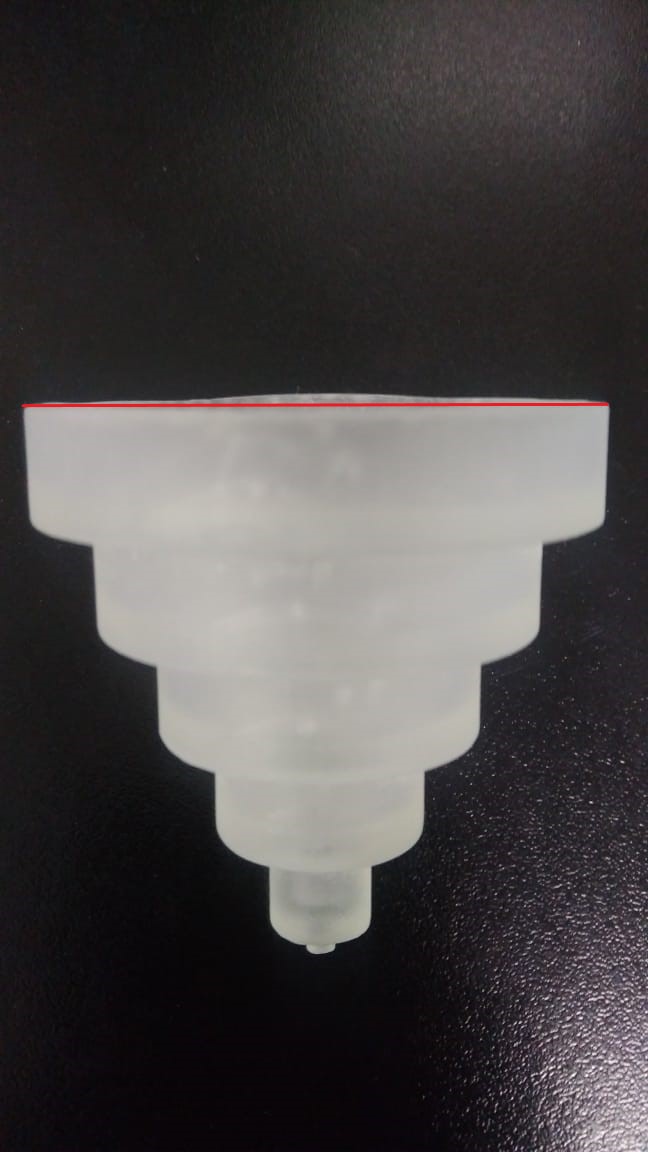
The pyramid you see was used as calibration. Each floor is 10mm in height, and the diameters go from 50mm, 40mm, 30mm, 20mm, 10mm & 3mm (Final floor consists in a cylinder of 3mm in height and 3mm in diameter). The print was made at 0.1mm resolution.
We printed it using standard supports generated automatically by preform (attached .form file)
Keops Pyramid.form (617.6 KB)

The slanted surface appears on the base of the print. When printed, this zone develops a “bump” that throws our dimmensions off.
If I rotate the pyriamid on its axis and measure the height of the first floor each 90°, I get the following measurements:
- 10.47mm (Directly over the bump)
- 9.78mm 90° to the right of the bump
- 9.72mm 180° of the bump
- 9.89mm 270° to the right of the bump
And the diameter of the first floor also varies in the following way:
- 49.76mm measuring with one tip of the caliper on the side with the bump and the point directly across the circumference of the base
- 49.50mm measuring from a line perpendicular to the prior measurment
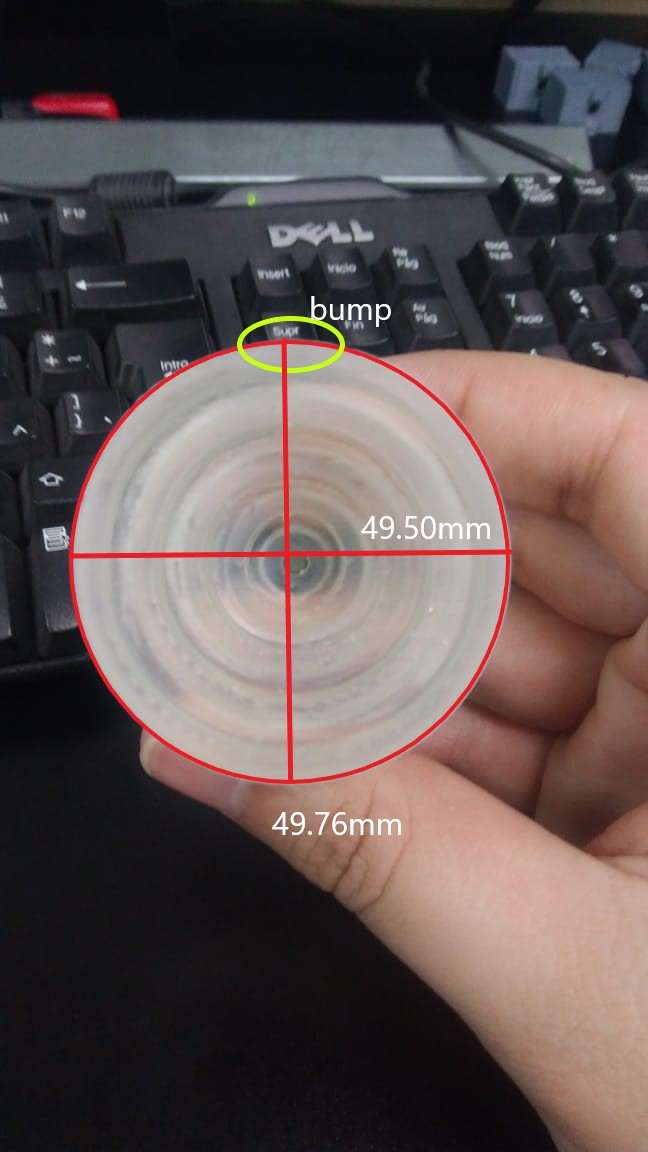
NOTE: All measurements were made AFTER CURING. Post-print process was as the following:
Removed the piece from platform, washed in IPA for 3min, agitating part manually. 30min session @ 60°C in Form Cure. After cure, supports were removed and sanded carefully.
At first we thought we could tackle the situation with adjustments in the X, Y, and Z fine tuning options.
We printed a small disk of 20mm in diameter and 3mm in height, with arrows pointing to the x and y direction.
After orienting said calibration disk (X-axis along the movement of the wiper), and printing it, we saw that the dimensions were indeed accurate in X and Y (measured after curing).
PRINT DONE DIRECTLY ON THE PLATFORM (No supports and lying flat on build plate)
Dimensions of the diameter according to its axis were:
*20.03mm along x-axis
*20.03mm along y-axis
We did saw a reduction in height (CAD: 3mm, Print: 2.52mm). We tuned the Z-offset to +0.4mm (after 3 iterations) and got an almost perfect disk with the following dimensions:
*20.04mm in diameter along x-axis
*20.13mm in diameter along y-axis
*3.00mm in height along z-axis
Adjustments seemed enough and we tried a new print. The model consisted in a ring of 88mm with 6mm in thickness, 23.876mm in height, and an interior chamfer. The print was again made directly on the build platform, with supports auto-generated in the chamfer and 0.1mm resolution.
Base Molde.form (634.5 KB)
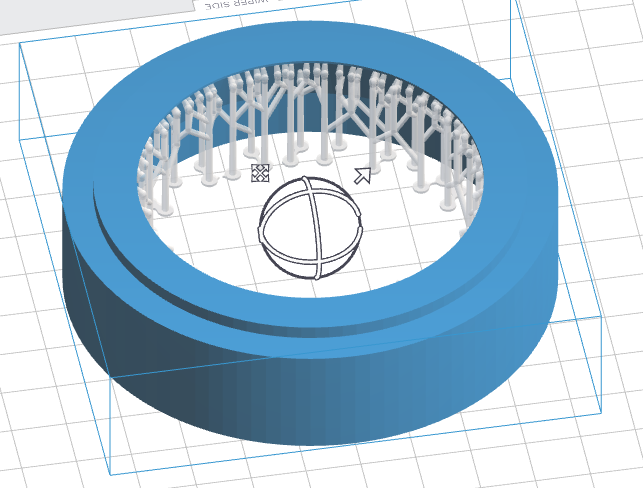
But we again got inaccuracies…
The disc on the top still has a slanted surface.
As an additional issue, we perceive a small curve on the periphery of the piece (Warping). It has a “C” shape and becomes bigger both at the base and the tallest surface of the piece.
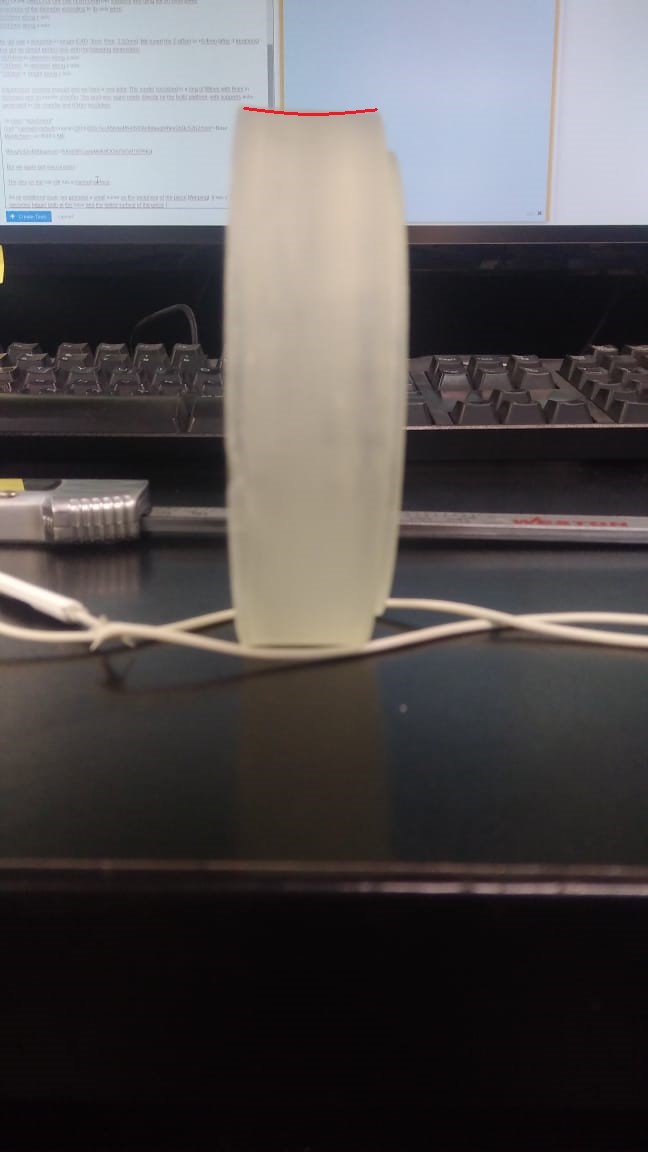
The diameter measurements are the following:
*At base: 88.45mm
*At middle: 87.78mm
*At top:88.06mm
and if I rotate the ring 90°
*At base: 88.38mm
*At middle: 87.79mm
*At top:88.29mm
And at the height, we got values that vary from 23.73mm to 23.97mm.
We already gave our form2 a full service. The machine is leveled, Resin tank is brand new (LT tank with only the prints mentioned before). Resin is Clear V4, fresh, directly from the liter and within usage date. Optic window was cleaned with PecPads and IPA according to formlabs support articles (0 smudges after searching the forums thoroughly for perfect results).
We already created a Ticket, but it’s been almost a week with no response.
We ask for your assistance, since we have dedicated a lot of effort to get consistent results with our machine. We already ran a whole liter of Clear V4 and a standard resin tank with no accurate prints.
Thanks in advance for your attention
