Hi everyone!
I’m translating my messages through ChatGPT, so I apologize in advance for any spelling mistakes.
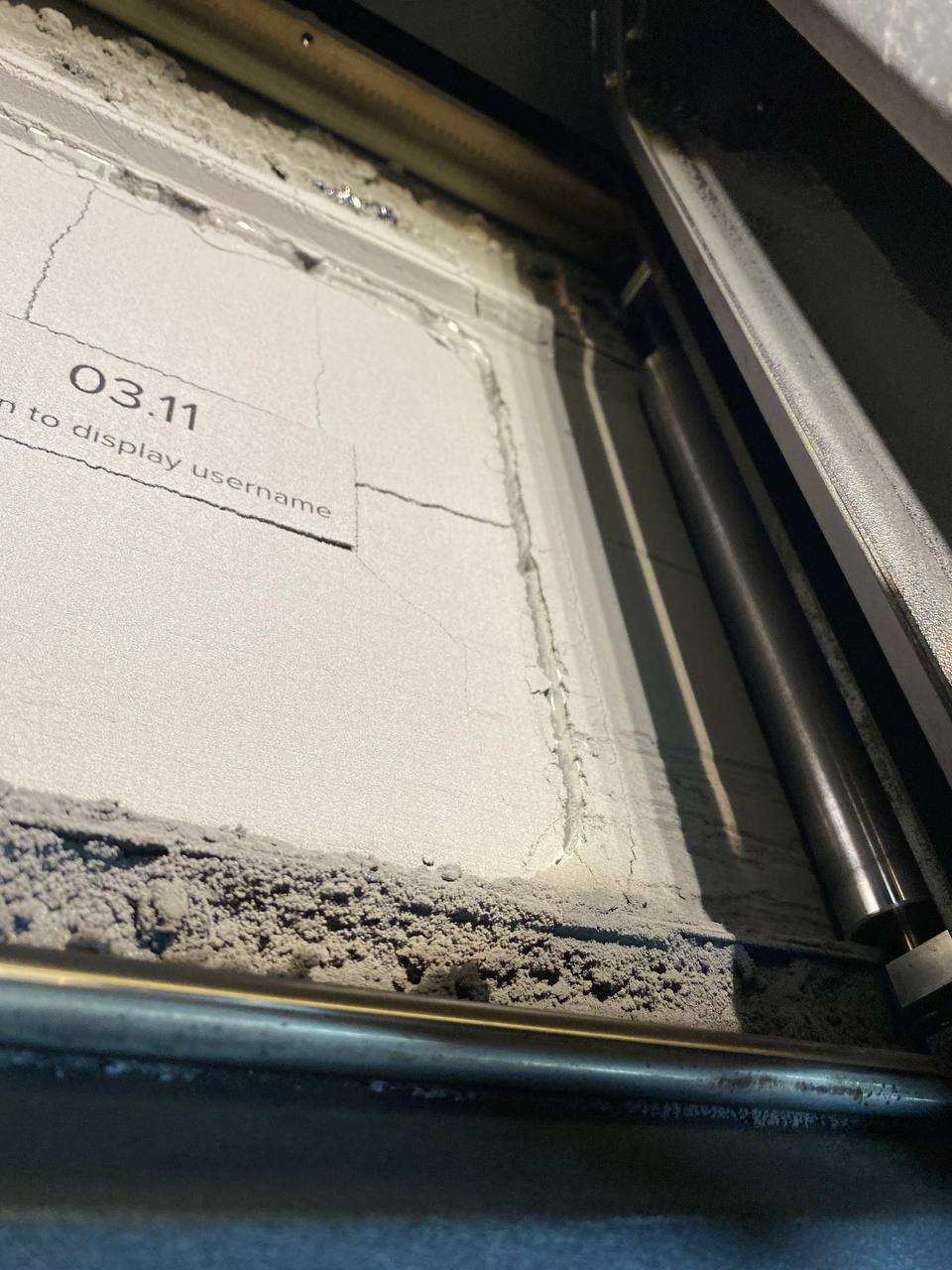
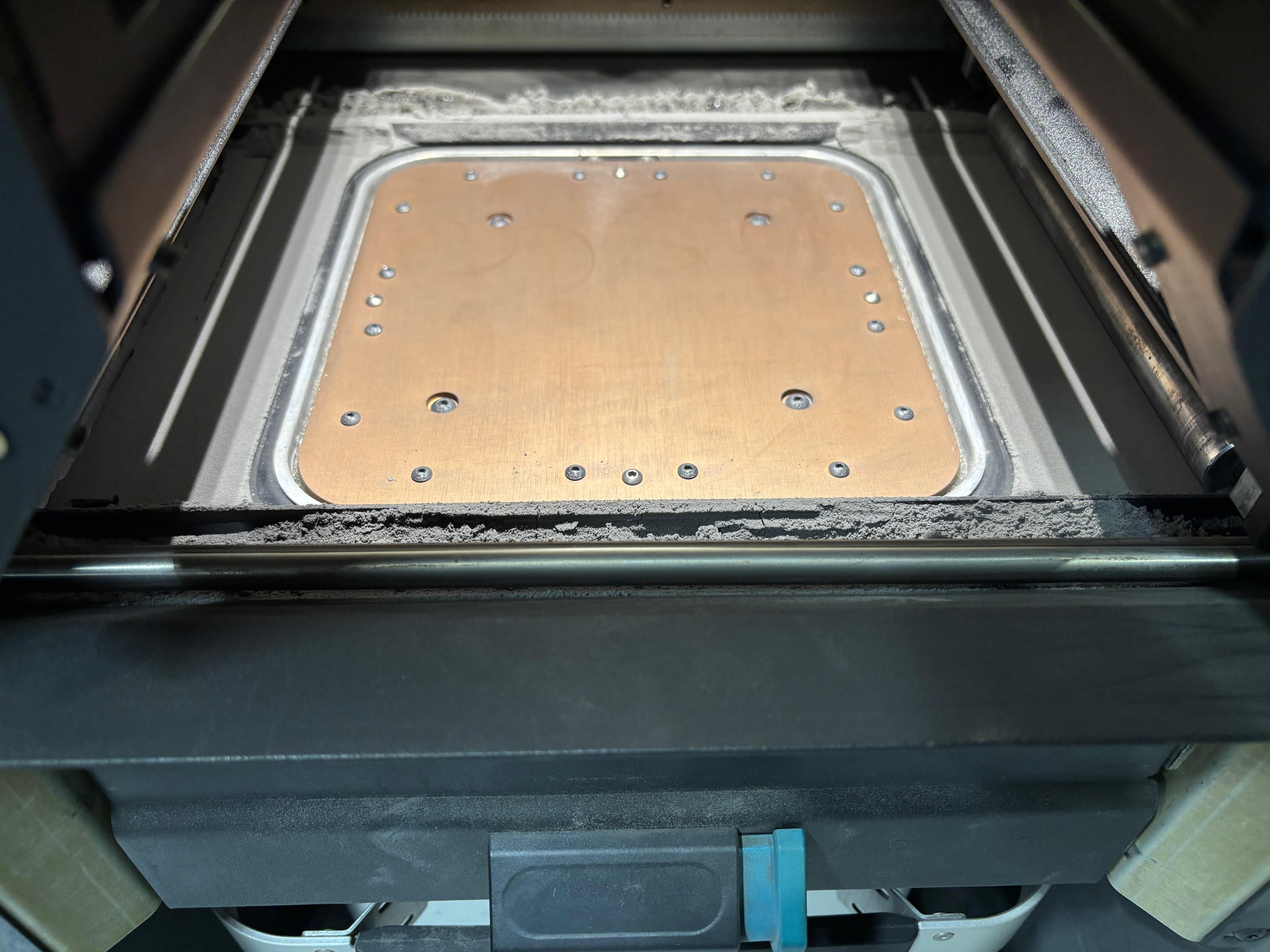
The issue I’m facing is that after the Fuse 1+ finishes printing, there’s a lot of loose and partially sintered powder around the build area. I’ve attached a photo showing what it looks like.
There used to be some excess powder before, but not nearly as much as now — and there was no sintered powder around the build area at all.
What could be causing this?
Could it be related to the powder not being clean enough, and could that lead to such artifacts?
I’m using Nylon 12 v1.
Has anyone experienced and solved a similar problem?
I have also seen a huge increase in the excess powder around the build area. If I print a full chamber there’s a lot of excess powder and it is always partially sintered. If it’s a short print, I still have some excess, but it’s not always partially sintered.
I think it has something to do with the print setting. I used to run Default only and I never had much excess powder. If I remember correctly, when I switched to Speed Optimized (which is the new Default) the excess powder issue started. From my experience, the only consequence of excess powder is waste, so I haven’t done any troubleshooting to resolve it.
That’s what my machine looked like after aging a cake of powder last week. I cant say if it looked like that after the bed temp calibration since it unloaded the entire cake into the machine.
I hadn’t seen this much powder buildup on the pa12 gf prints I did prior to switching to pa12
Good morning!
Here’s what it looks like on my machine @jmasterson — it’s very similar.
My print settings have been “Default” from the day I bought it until now, and this result started appearing literally in the last 3–4 print jobs.
This stuff makes me laugh. They want to control what powder customers can use for “quality assurance” but make changes like that reduce the customers experience. SMH
It looks very similar for us. I contacted support a few weeks ago. After seeing several pictures from us and the log data, support was very confident in saying that it was the recoater motor and that it should be replaced with the corresponding motor shaft.
The motor itself is not defective. It is the connector on the motor shaft.
We could take our Fuse apart and replace the entire motor assembly. However, since our Fuse has been printing without any problems for over a year and there is just a little too much powder on the sides, I will only do this if it is really necessary.
According to support, what was noticeable in our case was the fact that different doser offsets had no effect.
Of course, it is impossible to say for sure whether the cause is the same for other users.
However, if it were, hypothetically speaking, every user experiencing this problem would have to replace the motor assembly.
Ah, sorry, I don’t think I made myself clear.
The error described in LEADNAV’s post is different, that’s correct.
However, the post clearly shows the recoater motor and discusses the problem that the motor shaft and the connecting piece seem to be prone to errors.
In our case, the support team’s statement was quite clear that the recoater motor was also to blame for the error pattern “too much powder in the fuse on the sides.”
We followed up with the support ticket, as we cannot really imagine that the recoater motor, when driven irregularly, would cause too much powder to be in the fuse. We would rather suspect something with the doser motor.
However, the support team’s response was very clear: the problem (at least with our fuse) of too much powder was due to the recoater motor, and replacing it would solve the problem.
Hence my statement that if this error pattern can be remedied by replacing the recoater motor, then everyone would have to replace their motor.
However, since LEADNAV’s post mentioned, among other things, that the motor coupling seems to be the problem and that it does not appear to be particularly stable, it could be that we would have to constantly replace the motor, even though it is only the coupling that seems to be defective.
We need to make sure to vacuum the powder shelf and the troughs between print jobs. If the amount of powder still seems excessive, the powder dosing offset can be lowered. The best would be to open a ticket with us, our Service team is happy to help you further.
We have been experiencing this as well. It has only been more noticeable recently but weren’t too concerned and thought it was normal due the new print settings. after a relatively large print over the weekend, i found that the print had failed due to a 93/3 error and the recoater had become blocked.
It was a large hollow print so I’m not sure if that might have something to do with it as there would be a lot of unsintered powder in the chamber.
Hello @stuartT. Error 93/3 is typically due to debris on the gear of the roller. Please follow the steps from our support site article, Error 93/3 PR_ERROR_MOTORS_MOVE_DEVIATION__RECOATER and if you are unable to clear the error, I’d suggest opening a support case so that we can help guide you through the steps.
The amount of powder on the front and back of the printer is a familiar story.
While every print is cleaned up with a vacuum cleaner.
I have been printing with the “Speed Optimised Beta v5.3” settings for quite some time now.
Until recently, the doser offset calibration had no effect when using “Speed Optimised Beta v5.3” settings. This was mentioned in the description.
I was hopeful when I heard that “Speed Optimised Beta v5.3” was becoming the default.
However, I have not seen any improvement to date. And indeed, with longer prints, this results in error 93/3.
Now that others are also experiencing this problem, I suspect that the cause lies elsewhere. Perhaps the recoater speed is too high, causing more powder to be pushed against the sides?
There was some of the partially sintered powder stuck to the gears which could’ve been the cause. Would the piles in the corner not contribute to this also?
I was mainly wondering what the cause of this was since it seems recent and what would be the steps to stop wasted materials and failed prints.
@stuartT To start, make sure you vacuum all excess powder before each print. What I see in the photo isn’t too out of control and appears to be fairly normal. If you would like us to dig in a bit further, please contact support, and we’d be happy to look into your diagnostics.
Also, if this is a Fuse 1+, you do have the ability to adjust to dosing. You do want to be careful so that you don’t end up with underdosing.