Seems like Formlabs is moving away from the average consumers and going for big businesses that are served by companies like 3DSystems. I guess it’s par for the course with all of the anti-consumer stuff Formlabs has been doing the past few years. Great to see that Micronics acquisition has produced an affordable SLS machine for your average person… oh wait.
1 Like
@WoTech The minimum feature size and fine resolution will be comparable to the Fuse 1+. Laser spot size is only one piece of the puzzle - powder particle size and sintering dynamics are actually larger factors when it comes to this kind of print performance.
Any reason for single laser ?
It could make build time shorter for this kind of build volume
Same here, we will wait until TPU and 12 GF are fully validated
@raum For engineering decisions like this, there is usually no single reason that we can point to. Our team aims for the best balance between performance, reliability, and cost during the development, and achieved this with one laser in the Fuse X1.
Let me know if you have any other questions about the specs!
2 Likes
I just ran a simulation of my next print job in Preform using the X1. It’s absolutely ridiculous how the X1 practically swallows up a print job that doesn’t even fit entirely in our Fuse1+…
We could utilize our Fuse1+ at least 50% more efficiently, which is why the X1 unfortunately wouldn’t be profitable for us at all, but I can totally imagine that it’s really fun to work with this printer.
I think the new render view of the parts is absolutely great! It makes it easier to estimate the final result, especially with sloped or curved surfaces. Cool feature.
Fuse1+ Build:

X1 Build:
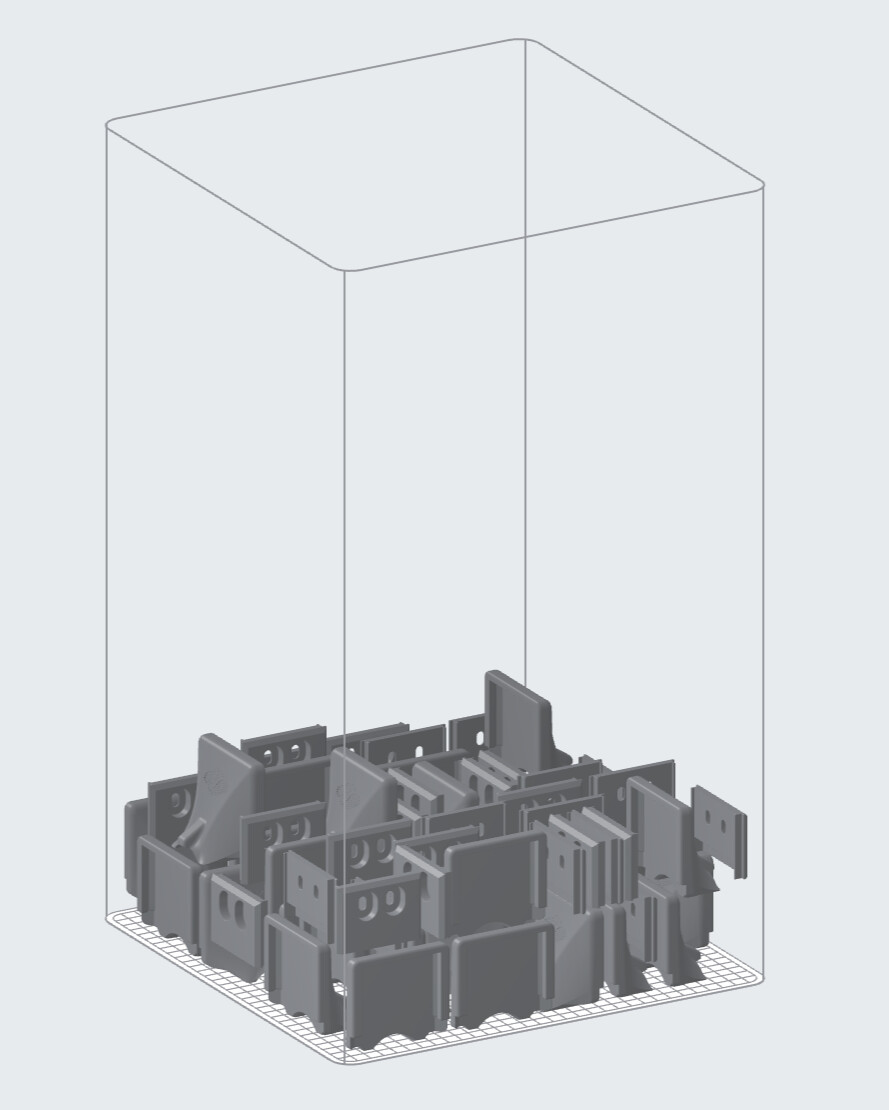
Render View:

4 Likes
Wait a minute, but if I load a part, orient it as I want, and then do “clone for 20 pieces” (for example) and ask Preform to position them in the build chamber, Preform changes the inclination and orientation of the pieces as it wants, without constraints? Am I doing something wrong? That seems silly to me!
You must lock the position of objects that you no longer want to be able to reorient.
Right-click on the object and, under the lock icon at the bottom, select which degrees of freedom the object should be given when it is selected.
This setting is also applied when the object is copied.
3 Likes
Hi! There is a known bug in the current PreForm version, model-locking features doesn’t work with Fuse X1 scene. We will fix that in the next version!
3 Likes
I had to try it out myself again just now, since I prepared another print job just yesterday.
The locking function itself works.
Yes, the parts can still be moved using the rotation tool after locking. However, the parts can still be locked for packing, so you can still print and work normally with this version (the parts are no longer rotated by the packing function after locking).
1 Like
Please include the ability to export stl files once textures are added!
I’m looking for clarity on the cost side of the Fuse X1. Where can I find a TCO calculation for Fuse X1, similar to the whitepaper published on the Formlabs website? A draft version would also be helpful.
Calculating SLS Cost Per Part for the Fuse Series 3D Printers | Formlabs
All in delivered is $180,000. Another $20K for the blast with large upgrade. Service plan is $12k-$15k a year. Material cost would be the same per part. Its 84kwh per day of usage if its running a full 24 hours meaning ~$15 a day.
2 Likes
Where did you get the sift pricing? I’m seeing $10-15k CAD. Could be a pricing error I’m not sure why the 120V option would run a whole $5k more Fuse Sift X1 - Shop3D.ca
1 Like
$3500 seems a little absurd for the larger blast drum… but I’ll probably buy it anyway lol.
I wonder if the fuse1 can be retrofitted to use the vacuum powder distribution scheme.
I’m curious why PA12 Tough and PA11 CF aren’t mentioned for the X1.
I can easily believe that PA11 CF is even harder to print than the other materials. It’s possible that the material feed hoses between the machines don’t work with fiber-reinforced materials.
But why isn’t PA12 Tough mentioned?
We’re planning to consider PA12 Tough for our Fuse1+ again soon, which is why this caught my attention during my research.
My guess…is that Formlabs is waiting to “beta test” it out with real users in Nylon 12 first…
When Nylon 12 GF first launched it wasn’t even possible to actually print it for months after its release until they made firmware updates and adjustments to actually make it possible… then they advertised a 30-50% refresh rate window for a year or two until they finally stopped advertising that nonsense and now list it at 50%…
So, I’m sure there will be a “beta testing phase” with actual users for awhile until they feel confident at other materials…
1 Like
Wait, wait, are you telling me that after years, Formlabs introduced the modern alternative to its Fuse printer, presenting a printer that costs the end user around $150k? And they haven’t revamped the Fuse 1 printer? Come on!
They announced 3 more products, the Fuse 1+ will not be updated it will be sold at a lower price and a new generation might appear with slightly larger volume but not sure because on the economics means another buildchamber, sift unit etc.
Also curious how the post processing keeps up with the higher output. Would be great to hear how the full workflow is optimized, not just the printing side.