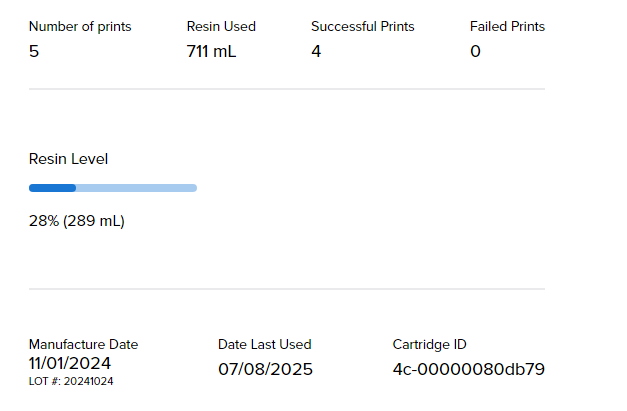
So I am a newbie using a Form 2 that I recently got to borrow from an association. I bought a 1L Cartridge of White V4.
Right now here is what it shows:
So it says 711 mL of Resin is used. When I look at the Print History there are 5 prints:
28 mL
59 mL
59 mL ← This one was however aborted and also displays as <1m min in print time
35 mL
8 mL
This gives me a total of 189 mL used even with the aborted print. Given that the tank is filled with 260 mL this adds up to 449 mL.
How can it display that 711 mL is used if the cartridge is brand new and sealed? I am pretty certain it was wrapped in plastic as well. The manufacture date is 11/01/2024 so it’s not old Resin (even though I don’t think that should cause this error)
Or am I misunderstanding something here?
Sadly, I think they guess
Hi @jonathanharr
Thank you for writing in about this.
@br4n_d0n is kind of correct: Unfortunately the resin tracking on Form 2 isn’t very great and all of the tracking is done in software through clever math, the Form 2 barely uses real world data to track the resin. This is why we have worked on this a lot, the Form 3 (although also not being perfect) is much better at this and the Form 4 incorporated a fairly accurate load cell with which we weigh the cartridges and finally give accurate readings.
What will happen is that your printer will give you warnings about “there may not be enough resin in your cartridge to fulfill this print” quite early, which you will have to skip unfortunately, but the printer will dispense until the Cartridge is actually empty.
For “Cartridge empty” (or rather “Cartridge Dispense Error”) we check the fill level in the tank, dispense resin, measure again (repeat) and if the fill level in the tank doesn’t change until a certain timeout even though we’ve attempted to dispense resin from the cartridge, the printer will display Dispense Errors.
I’d advise checking on you next print(s) if your Form 2 is dispensing with a small stream of resin or if there’s always just droplets coming from the cartridge.
If the latter is true, we should check your cartridge floor (the piece inside the printer that the cartridge is standing on) and more specifically the dispense arm, slow dispenses can throw the cartridge readings off quite a bit.
Also check the bite valve on the cartridge, if it’s fully open. Be careful not to cut it open too far or at an angle in case you’re manually open it up.
Kind regards,
Jakob
I was always wondering if my FORM_3 would use up the resin and signal me to add a new resin tank and just resume the print. I’m guessing from your comment that is the case.
Hi @bitsyncmaster
Yes, it’s more or less the same system on the Form 2 and Form 3.
Once the printer does not see any changes in resin level in the tank even while it’s trying to dispense resin from the cartridge, it will give you the “Cartridge Dispense” error message.
The printer does not stop trying to dispense if the level of resin in the cartridge is reported as 0ml.
The only thing that could prevent this from happening is if your cartridge is dispensing extremely slowly (because the vent cap wasn’t opened, the bite valve is not cut all the way through, something is wrong with the dispense mechanism, etc.), it could potentially throw a “cartridge worn out” error before a cartridge is empty.
If the printer has opened the bite valve enough times to theoretically have it dispense more than 3L of resin, we lock it to prevent damage to the bite valve, it falling off and spilling resin into your printer.
For this to occur you would have gotten the “slow dispense” warning on basically all of your prints (which you can skip) though, so if you don’t get these, you won’t run into this problem.
(And if you do get the “slow dispense” warning a lot I recommend to get in touch with us in the services team so we can help you resolve this).
Kind regards
Jakob
FORM_3 is designed to notify you when resin runs low and supports resin tank swaps to resume printing seamlessly