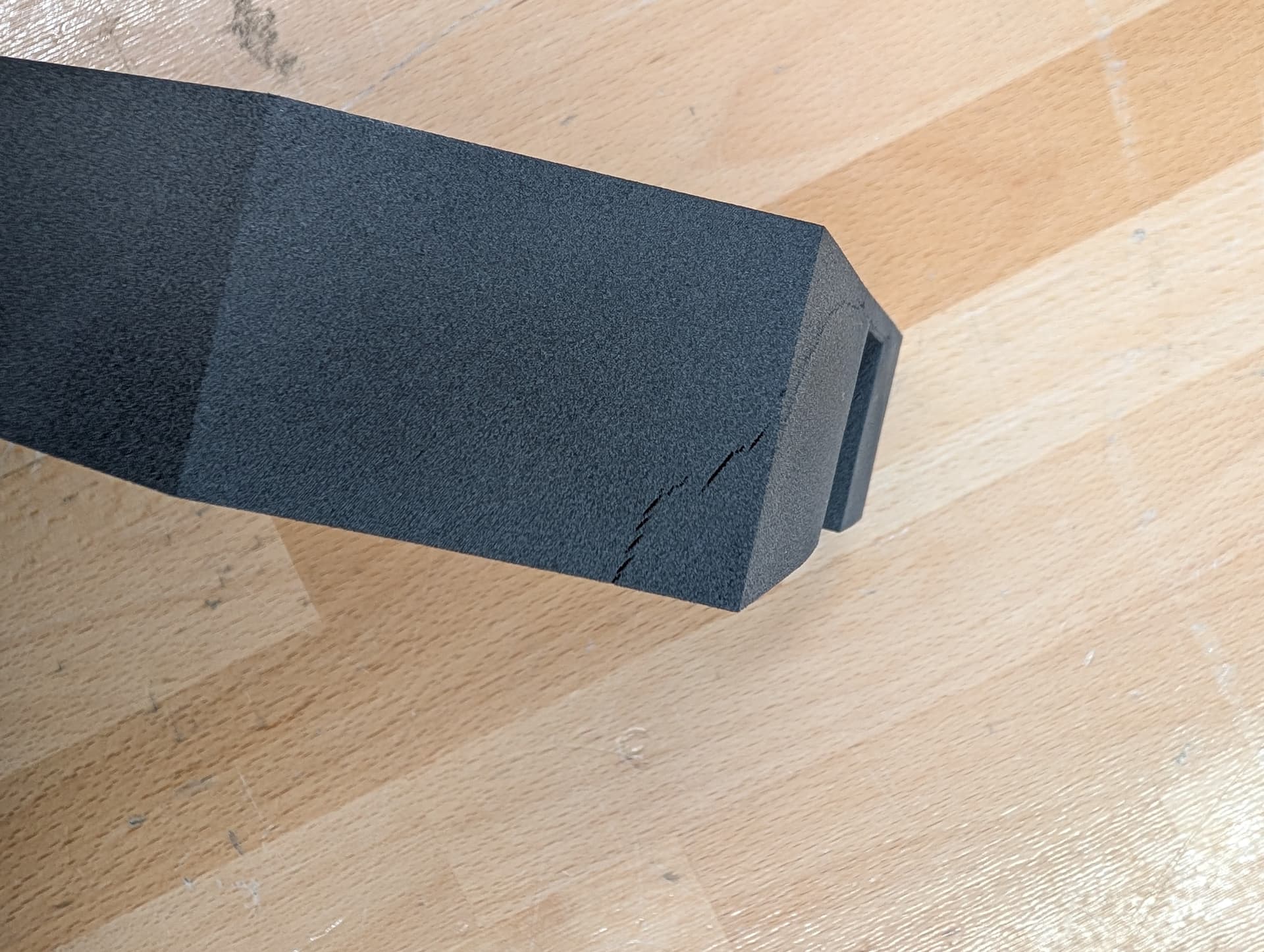
I’ve now observed layer delamination on the same part for the second time on my Fuse1+, and in two different printing processes.
I’ve printed a total of 20 pieces of this part—17 came out fine, one was warped, and two showed this layer delamination.
Has anyone experienced something like this before and can offer an explanation? Could it be an issue with the part’s design, or is my printer acting up again?
Hi @KuemmeMl
Thank you for writing in. From looking at the part and the delamination, I think your printer might be running a tiny bit cold.
I’d advise printing the temperature test print (this looks like it’s Nylon 12?). Make sure to use the correct test for your material and make sure to follow the guide on identifying the best print, we’re not looking for the best looking one. Feel free to reach out to us in the services team, we’re happy to advise on what temperature to use.
The bump on the side could be a symptom of layer shifitng, but it might have also been caused by the (also likely temperature related) warping on your part.
Was this piece printed in the first bit of your print and did other parts have a bump like this as well?
Hi @CARobertM
currently we have them for Nylon 12, Nylon 12 White and Nylon 12 Tough and are working on one for Nylon 12 GF.
If you reach out to us in services we’d be happy to help adjust temperature visually and by checking your printers Diagnostic Logs,
I’m unsure where the process is at the moment but we might be able to share an internal beta of the Nylon 12 GF temp test, no promises though.
We use Nylon 12 GF. I contacted support about a year ago and received a temperature test, which I carried out. I will try it again soon. I should still have the file somewhere.
Hi @CARobertM
thank you for getting back to me and sharing your feedback.
I will certainly pass this on, this is definitely not the way we would like things to go. Are you still having print issues at the moment? I’d be happy to open up a new conversation where the previous one left off without producing satisfying results.
We’re always attempting to get and do things better. Not releasing settings and tests too hastily is part of that.
We’re constantly aiming to improve these tests, but when we feel they are not reliable and repeatable enough to be used as actual calibration tools, we use them sparingly.
i have moved on to a 3rd party material since you dont offer what i need.
“not releasing settings and test too hastily is part of that”
Do you hear yourself? Its acceptable to release a product when your own calibration file isnt even ready? and how many firmware releases have caused major issues and disrupted business for your customers companies?
Maybe i have a unique opinion but if your product doesnt have a calibration file, your product isnt ready for market.
Hi @CARobertM
ah, that’s cool, I’m glad that you found a suitable material. If you let me know what the material properties you are looking for are, I’d be happy to pass this on to the materials team as feedback. If enough customer demand is there for special material types we’re always open to implement them in the future.
We’re sorry about any inconveniences any firmware/software updates have caused and we’re always trying to improve. While it’s very rare, I don’t want to say that updates have never caused issues, but please believe me when I say that it is just as frustrating for everyone at Formlabs as it is for our userbase. We do not want our customer to be frustrated and troubleshoot without end, we want people printing.
The fact of the matter is that we have over 130.000 printers out in the wild (and that number is from January 2024, before the launch of the Form 4 line) and we simply cannot test every little change we make for every environment our customers put these machines in.
You are also free not to apply firmware and software updates if you prefer that. Within PreForm you can head to File → Preferences → Automatic Updates and leave it off, only updating whenever you feel that updates have been out for a certain amount of time.
And I feel I have to clarify a bit on that statement about the calibration:
We do calibrate our printers.
Every printer runs through a suite of tests before it leaves our manufacturing, Fuses for example run through all sorts of calibration test prints before being anywhere close to getting packed up.
The Print Temperature Test prints are an additional tool for troubleshooting purposes in cases something does not work out as expected or we want to up the powder recycle rate.
Hi @CARobertM
Thank you for the specifics.
We have certified our Nylon 12, Nylon 12 GF, Nylon 12 Tough, Nylon 12 White and Nylon 11 with the UL94 Section 7 standard, although they only reached an HB rating.
I know you have a workflow right now, but if you’re interested in a Resin Print in our Flame Retardant Material (UL94 V-0 Rating at 3mm wall thickness and passed 12 second burn test), shoot us a message and we can certainly print one of your models and get it sent over.
I have passed a feedback on to our materials team about the need of a better Flame Retardant Material in the SLS workflow and am also checking in with the Materials team if the Flame Retardant Resin has only been tested up to 12 seconds vertical burn or if it was tested further and didn’t meet the specifications anymore and will get back to you on that if you’re interested.
There is a 3rd party in Europe that recently announced they have a profile for their v-0 pa12 but they havent tested against the FAA specs and even so, they dont expect it will be available until later this year.
Hello everyone,
I have now received the file for the temperature test from support again and have carried out the test. Unfortunately, I couldn’t find any negative areas in the printed parts, so I stuck with the original temperature of ±0°C. I then printed a full print bed of parts, all of which turned out well, except for one, which you can see in the pictures. This part had a rift and wave formation.
Would you recommend increasing the temperature by +0.5°C to see if it improves the result?
I don’t know what material you are running, but when I did the temp test and sent in pics, support was looking for some orange peel on the test and had me adjust the temp target toward the section with the orange peel. They explained that the test prints without armor so I guess it has more orange peel.
My guess is if your test print tiles all look good, as in good surface finish, you need to adjust the offset and re do it. If it were me I would send support some pics of the test print tiles and get their recommendation. I followed their recommendation and the results have been very good.
Have you ever found this defects(orange peel/birchbarking but localized on the opposite side of the hopper and towards the front?
I’m facing repeated issues of this defects on very cosmetic flat parts, and support only appoints to refresh powder everytime this appears. But the solution last for 3 builds and then it appears again, last time the 4th one with powder in good condition and the rest of the parts came out ok.
Yes, I’ve had the same problem before. We then adjusted the temperature, but unfortunately it didn’t help. We also changed the powder several times on the recommendation of support, but without any long-term improvement. On our own initiative, we connected nitrogen for one build job. After that, we printed normally again and had the impression that it improved things a bit. We considered whether a valve might have been stuck and was released by the pressure from the nitrogen bottle.
After the recent problems, I reset the printer to factory settings. Since then, I’ve had a better surface finish than ever before, which I honestly can’t explain. Unfortunately, I’m now seeing cracks and warping in parts that span the entire build area. I performed the temperature test as recommended, but it didn’t show any noticeable results. I then tried one print at -0.5°C and another at +0.5°C, but that didn’t help either. Before the reset to factory settings, the printer was always running at -0.5°C.
I’m guessing the used powder and number of cycles has something to do with this. For a while I was running 30% refresh and experienced this issue. Support recommended dumping the used powder and starting over, but for me what solved it was going to 40-45% refresh, which required some redesign of my models to accommodate the higher packing density. I have not seen the issue since.
I have the exact numbers somewhere, but no matter how high your packing density is some used powder remains from print to print so you will have a buildup of used powder that has been degraded. The lower the refresh rate, the higher the buildup of degraded powder, hence their recommendation to dump the used powder periodically. This is my understanding.